Koze Music Distribution FAQ
Table of Contents
1. Tipalti Setup Instructions for Receiving Distribution Payments
2. Migration Instructions for Previously Distributed Songs
Table of Contents
Tipalti Payment Setup
How to set up your payment information to receive royalties through Tipalti
Migrating Existing Releases to Koze Music Distribution
How to transfer your existing releases from another distributor while preserving streaming history, playlists, and release information
Tipalti Setup Instructions
Koze Music Distribution is partnering with Tipalti, the world's leading global payment automation service.
Here are instructions so you can get set up via your Koze Music Distribution portal to receive payments.
Feel free to email distro@kozemusic.com if you have any questions or issues during the setup process.
1. Login in your Koze Music Distribution Portal, click the Koze icon in the top left, and click the Workspace Settings wheel for your account:

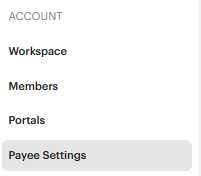
2. Under Account, Click on Payee Settings:
3. Under the Default Payment Method of your Payee Settings, you will be able to select Tipalti in the dropdown:

4. Click the Save Changes button that pops up.
5. Click the Edit button below Tipalti:

6. The system will then guide you through the registration sections outlined below. Please be advised that inaccurate information will cause delays in payments being processed to you.
• Contact Details: Name, Address, Email, Phone
• Payment Details: Payment method (please note there may be a fee associated with certain payment methods), currency selection, routing and account numbers, or PayPal account (based on the payment method chosen)
• Tax Identity: The portal will guide you in selecting the right tax forms (W-9, W-8, VAT, etc.) and walk you through the information-gathering process, including your EIN, SSN, and/or VAT.
TIPALTI
SETUP
INSTRUCTIONS
Koze Music Distribution is partnering with Tipalti, the world's leading global payment automation service.
Here are instructions so you can get set up via your Koze Music Distribution portal to receive payments.
Feel free to email distro@kozemusic.com if you have any questions or issues during the setup process.
Login in your Koze Music Distribution Portal, click the Koze icon in the top left, and click the Workspace Settings wheel for your account:
Under Account, Click on Payee Settings:
Under the Default Payment Method of your Payee Settings, you will be able to select Tipalti in the dropdown:
Click the Save Changes button that pops up, then click the Edit button below Tipalti:
The system will then guide you through the registration sections outlined below. Please be advised that inaccurate information will cause delays in payments being processed to you.
Contact Details: Name, Address, Email, Phone
Payment Details: Payment method (please note there may be a fee associated with certain payment methods), currency selection, routing and account numbers, or PayPal account (based on the payment method chosen)
Tax Identity: The portal will guide you in selecting the right tax forms (W-9, W-8, VAT, etc.) and walk you through the information-gathering process, including your EIN, SSN, and/or VAT.
Migrating Existing Distributed Releases to Koze
If you would like to migrate existing distributed works (currently live on DSPs) via Koze's Distribution services,
and maintain all streaming stats and history, please follow the instructions below.
1. Find the current list of DSPs where the assets are actively distributed, and request a takedown of the assets from these 3 DSPs first with your distributor:
• NetEase — China’s largest DSP
• Flo — South Korea
• JOOX — Southeast Asia and South Africa
2. Email distro@kozemusic.com to let us know you are planning to send us a previously-distributed release, so we can flag it for review and merge it with the existing assets to preserve your stream count.
3. Once the songs are confirmed taken down from those 3 DSPs, upload the release via the Koze Music Distribution portal and fully set it up. IMPORTANT: ISRC, UPC, title, version, audio, length, artists, and all metadata must match the original
4. Koze will then distribute to all DSPs. NetEase, Flo, and JOOX should automatically merge the assets; duplicates will be created for all other DSPs, which we'll then review and confirm they have matching metadata, streams etc.
5. Once we have confirmed everything successfully matches, we'll inform you and you can issue a full takedown for the release at any remaining DSPs from the previous distributor.
Never request a full takedown from the prior distributor until we have confirmed the track has re-linked on the DSPs and Spotify play counts match.
Taking down too early breaks stream counts, playlists, and reviews. The one exception is the three DSPs listed above.
MIGRATING EXISTING
DISTRIBUTED RELEASES
TO KOZE
If you would like to migrate existing distributed works (currently live on DSPs) via Koze's Distribution services, and maintain all streaming stats and history, please follow the instructions below.
Find the current list of DSPs where the assets are actively distributed, and request a takedown of the assets from these 3 DSPs first with your distributor:
Email distro@kozemusic.com to let us know you are planning to send us a previously-distributed release, so we can flag it for review and merge it with the existing assets to preserve your stream count.
Once the songs are confirmed taken down from those 3 DSPs, upload the release via the Koze Music Distribution portal and fully set it up.
Important:ISRC, UPC, title, version, audio, length, artists, and all metadata must match the original
Koze will then distribute to all DSPs. NetEase, Flo, and JOOX should automatically merge the assets; duplicates will be created for all other DSPs, which we'll then review and confirm they have matching metadata, streams etc.
Once we have confirmed everything successfully matches, we'll inform you and you can issue a full takedown for the release at any remaining DSPs from the previous distributor.
DSP Delivery Lead Times
Please see below for average delivery times by platform. These are general estimates, and actual delivery times can be faster or slower.
To make sure your release goes live on time across all platforms and services, please deliver it to us at least 5 days before your planned release date.
.png)
If you have any questions, please email us at distro@kozemusic.com.
You can also refer to the FAQs available during the registration process.
